[한국어](#한국어) | [English](#english)
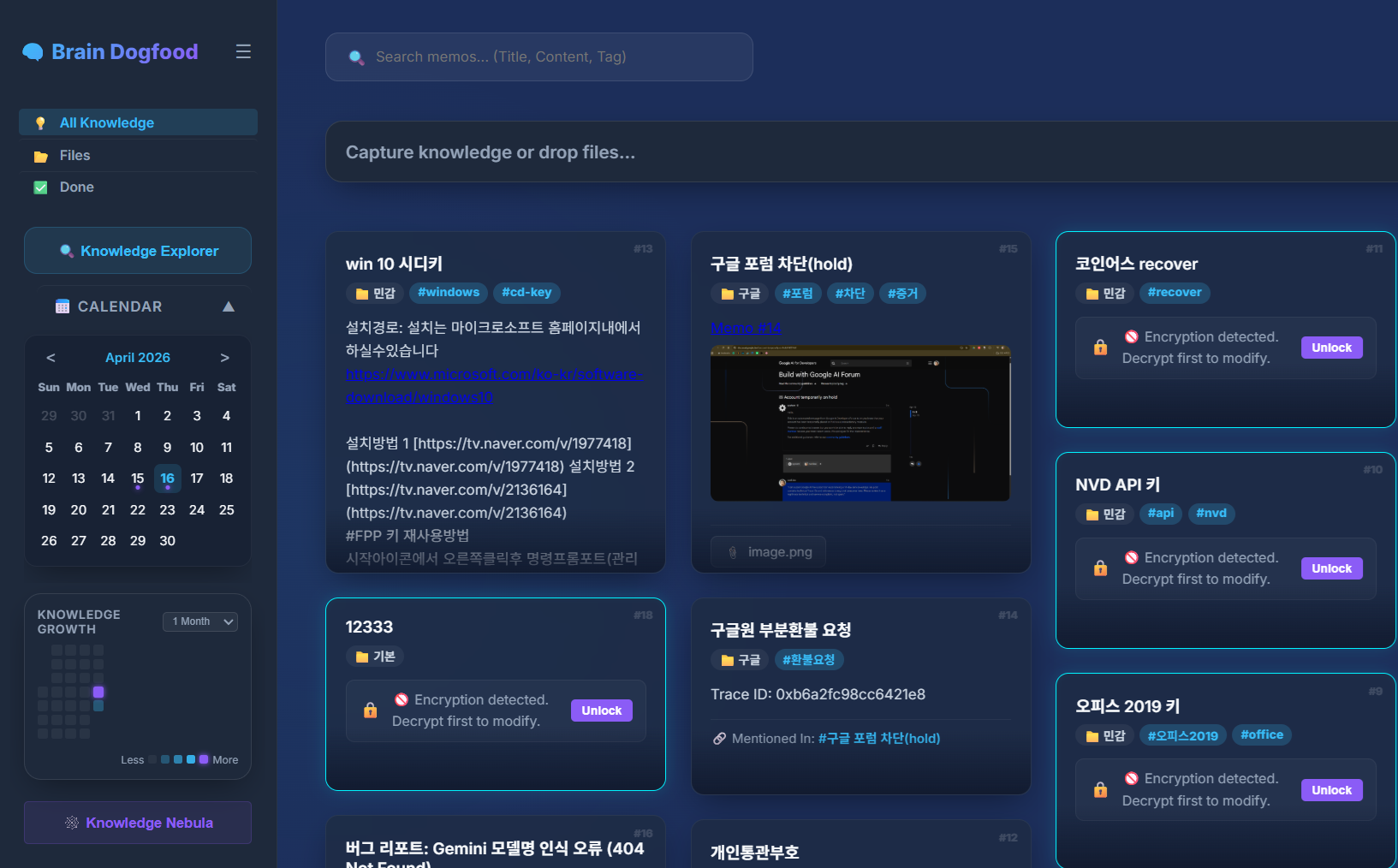
Brain Dogfood Dashboard

🧠 뇌사료 (Brain Dogfood)

지식을 기록하는 습관을 넘어, 지능형 유기체로 성장하는 나만의 지식 창고

Minimalist, AI-powered, Privacy-first Knowledge Server

--- > [!IMPORTANT] > **보안 주의사항 (Security Notice)** > - 기본 관리자 계정은 아이디: `admin` / 비밀번호: `.env` 파일에서 본인이 설정한 값입니다. > - 최초 로그인 후, 혹은 서버 실행 전 **`.env` 파일에서 `ADMIN_USERNAME`과 `ADMIN_PASSWORD`를 반드시 본인만의 정보로 수정**하세요. 수정하지 않을 경우 보안에 매우 취약해질 수 있습니다. > [!NOTE] > **AI 기능은 선택 사항입니다 (AI is Optional)** > - **Gemini API 키가 없어도** 뇌사료의 핵심 기능(기본 메모, 히트맵, 지식 그래프 Nebula, 개별 암호화 등)은 **모두 정상 작동**합니다. > - AI 기능(`GEMINI_API_KEY`)은 자동 요약과 인공지능 태깅 기능을 사용할 때만 필요합니다. ---

📄 프로젝트 소개

**뇌사료(Brain Dogfood)**는 "내가 만든 지식은 내가 먼저 소비한다"는 철학에서 시작된 개인용 메모 서버입니다. 단순한 텍스트 기록을 넘어, AI가 당신의 지식을 분석하고 유기적인 그래프(Nebula)로 연결하여 새로운 통찰을 제공합니다. 또한 사용자의 정보를 절대 해독할 수 없는 암호화 방식을 지원합니다. **"모든 데이터는 유출될 수 있다. 하지만 내 머리속의 패스워드는 절대 유출될 수 없다"** 라는 신념으로, 설사 데이터가 통째로 유출당해도 '개별 암호화'된 데이터와 첨부파일은 사용자가 설정한 비밀번호 없이는 현대의 기술력으로 해독이 불가능합니다. ### ✨ 독보적인 강점 * **지능형 지식 네트워크 (Nebula & Visual Linker)**: 단순한 기록을 넘어, D3.js 기반의 '지식 성단' 시각화와 **시각적 와이어링(Alt+클릭)** 기능을 통해 파편화된 정보를 유기적인 지능체로 연결하세요. 인간의 사고 흐름을 물리적인 선으로 가시화하는 혁신적인 UX를 제공합니다. * **지식 허브 & 무제한 다중 연결 (N:N Multi-Link)**: 하나의 메모를 수백 개의 아이디어와 잇는 '지식 허브(Hub)'를 구축하세요. AI의 기계적 연결이 아닌, 사람의 의도적인 큐레이션으로 기억의 지도를 완성합니다. * **Privacy-First Security**: 메모별로 개별 암호화를 지원하여 절대적인 보안을 보장합니다. 서버 관리자조차도 당신의 마스터 비밀번호 없이는 지식을 엿볼 수 없습니다. * **High-End UX & Aesthetics**: 글래스모피즘 기반의 모던한 UI와 하이엔드 셰이더 효과, 빠른 생산성을 위한 풍부한 단축키 및 슬래시 명령어를 제공합니다. --- ### 🚀 최신 업데이트 (v2.0) * **비주얼 노드 링커 (Visual Node Linker)**: `#ID` 배지를 `Alt + 클릭` 드래그하여 지식과 지식을 선으로 잇는 '와이어링'을 수행하세요. 지식의 선후 맥락을 가장 직관적으로 설계하는 방식입니다. * **멀티링크 에코시스템 (Multi-Link Ecosystem)**: 한 메모 내에 여러 지식 링크(`[[#ID]]`)를 삽입하여 거대한 지식 클러스터를 형성할 수 있습니다. * **고속 워크플로우 (Instant Edit)**: 메모 카드 위에 마우스를 올리고 `e`를 누르면 즉시 수정 모드 진입. 모달 클릭의 피로감을 제로로 만듭니다. * **드래그 앤 드롭 링크**: 메모 카드를 작성기(Composer)로 드래그하여 즉시 참조 링크를 삽입하세요. ### 🛠️ 패치 노트 (2026-04-20) * **세션 타임아웃 카운트다운**: 로그아웃 버튼에 실시간 세션 남은 시간을 표시하는 타이머를 추가하여 예기치 않은 로그아웃으로 인한 데이터 유실을 방지합니다. * **버튼 UI 최적화**: 타이머 표시 공간을 확보하기 위해 로그아웃 버튼 텍스트를 "종료" / "EXIT"로 축약하였습니다. * **지능형 세션 연장**: 클릭이나 키보드 입력 등 사용자 활동이 감지되면 타이머가 자동으로 초기화되어 세션이 유지됩니다. ### 🛠️ 패치 노트 (2026-04-19) * **파일 첨부 접근성 개선**: 지식 작성기(Composer)에 명시적인 파일 첨부(📎) 버튼을 추가했습니다. (드래그 앤 드롭과 병행 가능) * **모바일 UX 최적화**: 모바일 기기에서도 조작이 편리하도록 "파일추가" 텍스트 레이블을 추가했습니다. * **다국어 지원 안정화**: 첨부파일 관련 툴팁 및 레이블에 한/영 i18n을 적용했습니다. --- ## 🆚 memos vs 뇌사료 (Comparison) | 기능 | **memos (Open Source)** | **🧠 뇌사료 (Brain Dogfood)** | | :--- | :--- | :--- | | **기본 철학** | 타임라인 기반 마이크로 블로깅 | 유기적인 지식 연결 및 AI 통찰 | | **시각화** | 단순 달력/히트맵 | **D3.js Knowledge Nebula (그래프)** | | **AI 통합** | 외부 플러그인 의존 | **Gemini 2.0 Native 통합 (자동 요약/태그 / 선택 사항)** | | **보안** | DB 전체 보안 | **메모별 개별 암호화 (Grain-level Security)** | | **사용성** | 모바일 앱 위주 | **데스크탑 생산성 최적화 (Slash Commands & Shortcuts)** | | **디자인** | 미니멀, 정적인 UI | **Modern Glassmorphism & 다이내믹 애니메이션** | --- ## ⌨️ 생산성 단축키 | 동작 | 단축키 | 설명 | | :--- | :--- | :--- | | **저장/수정** | `Ctrl + Enter` | 작성한 메모를 즉시 서버에 반영 | | **새 메모** | `Ctrl + Shift + N` | 언제 어디서든 즉시 작성창 호출 | | **슬래시 명령** | `/` | `/task`, `/ai`, `/h2` 등으로 빠른 서식 지정 | | **지식 탐색기** | `Ctrl + Shift + E` | 저장된 지식의 구조를 한눈에 파악 | | **즉시 수정** | `e` (Mouse Over) | 카드 위에서 바로 편집 모드로 진입 | | **비주얼 링커** | `Alt + #ID 클릭` | 지식과 지식을 선으로 잇는 '시각적 와이어링' | --- ## 🗺️ Vision Roadmap - [ ] **v3.0 - Neural Mind-Map Mode**: 그룹 필드를 루트 노드로 활용하여 지식의 위계를 한눈에 파악하는 마인드맵 레이아웃 도입. - [ ] **v4.0 - Fractal Knowledge Deep-Dive**: 무한히 깊어지는 프랙탈 구조의 시각화를 통해 방대한 지식을 입체적으로 탐험하는 인터페이스 구축. - [ ] **Obsidian Plugin**: 로컬 옵시디언 환경과 뇌사료 서버 간의 실시간 지식 동기화 브릿지. --- ## 🛠️ 시작하기 (Quick Start) 사용자의 환경에 맞춰 두 가지 방법 중 하나를 선택하여 실행할 수 있습니다. ### 방법 1: 네이티브 직접 실행 (권장) ```bash # 1. 저장소 복제 및 종속성 설치 pip install -r requirements.txt # 2. .env.example을 .env로 복사 후 설정 수정 (필수) cp .env.example .env # 3. 서버 실행 python brain.py ``` ### 방법 2: Docker로 실행 (컨테이너) 도커가 설치되어 있다면 아래 명령어로 즉시 서버를 구축할 수 있습니다. ```bash # 1. .env 설정 완료 후 docker-compose up -d ``` *데이터베이스와 업로드 파일은 호스트의 `data/`, `static/uploads/` 디렉토리에 안전하게 저장됩니다.* --- ## 🌐 접속 방법 서버가 실행되면 브라우저를 통해 다음 주소로 접속할 수 있습니다: - **로컬 접속 (동일 PC)**: `http://localhost:5093` - **외부 접속 (타 기기/모바일)**: `http://<서버 IP>:5093` > [!TIP] > **포트 설정 변경**: > 기본 포트(윈도우: 5050, 리눅스: 5093) 외의 다른 포트를 사용하려면 `.env` 파일에서 `PORT=원하는포트` 설정을 추가하세요. > [!TIP] > **리눅스에서 서버 IP 확인하기**: > 터미널에서 `hostname -I` 명령어를 입력하면 현재 서버의 내부 IP 주소를 확인할 수 있습니다. *`.env` 파일에서 관리자 아이디와 비밀번호를 꼭 수정하고, 필요한 경우에만 `GEMINI_API_KEY`를 등록하세요.* ---

🌐 English Description

### What is Brain Dogfood? **Brain Dogfood** is a minimalist yet powerful personal knowledge server built on the philosophy: "I consume the knowledge I create." It’s not just a memo app; it’s an **intelligent knowledge ecosystem** that grows with you. We provide a security model where user data is practically undecipherable. Built on the conviction that **"Data can be leaked, but the password in my head cannot be,"** even if the entire database is compromised, any "grain-level encrypted" notes and attachments remain impossible to decrypt without the specific password known only to you. > [!IMPORTANT] > **Security Notice**: > Default credentials are set in the `.env` file. **You MUST change `ADMIN_USERNAME` and `ADMIN_PASSWORD`** in your `.env` file before running the server in a public environment. > [!NOTE] > **AI is Optional**: > All core features (Memos, Heatmap, Knowledge Nebula, Encryption) work perfectly **without an AI API key**. The `GEMINI_API_KEY` is only required for automated summarization and AI tagging. ### Key Features - **Intelligent Knowledge Network**: Beyond simple notes, build a "Biological Intelligence" through D3.js-powered **Nebula Maps** and **Visual Wiring (Alt+Click)**. - **Human-Centric Linking**: While AI assists in analysis, *you* define the connections. Build high-density **Knowledge Hubs** that mirror your own cognitive patterns. - **N:N Multi-Link ecosystem**: Support for unlimited bidirectional links between notes, allowing for complex, fractal-like knowledge growth. - **Grain-level Encryption**: Advanced security for individual memos – your thoughts are encrypted with your master key, invisible even to server admins. - **Premium Aesthetics**: High-end Glassmorphism UI with smooth micro-animations and production-ready shortcuts. ### 🆕 What's New in v2.0 - **Visual Node Linker**: Wire your ideas by `Alt + Clicking` the #ID badge. The most intuitive way to bridge text and visual structure. - **Multi-Link Support**: Insert multiple internal links (`[[#ID]]`) to create clusters of networked thought. - **Instant Edit (e-key)**: Hover over a memo and press `e` to jump straight into editing mode. Zero-click productivity. - **Drag & Drop Workflow**: Drag memo cards into the composer to instantly insert a semantic reference. ### 🛠️ Patch Notes (2026-04-20) - **Session Timeout Countdown**: Added a real-time countdown timer to the logout button to prevent unexpected data loss from session expiration. - **UI Optimization**: Shortened the logout label to "EXIT" / "종료" to minimize button size and accommodate the countdown timer. - **Active Session Reset**: The timer automatically resets upon user activity (clicks, key presses), keeping your session active while you work. ### 🛠️ Patch Notes (2026-04-19) - **Improved Attachment Accessibility**: Added a dedicated Attach File (📎) button to the Composer. - **Mobile UI Optimization**: Added an "Add File" text label next to the icon on mobile devices for better touch usability. - **I18n Stabilization**: Implemented full Korean/English translation for all attachment-related UI elements. --- ## 🆚 memos vs Brain Dogfood (Comparison) | Feature | **memos (Open Source)** | **🧠 Brain Dogfood** | | :--- | :--- | :--- | | **Philosophy** | Timeline-based micro-blogging | Organic knowledge linking & AI insights | | **Visualization** | Basic calendar/heatmap | **D3.js Knowledge Nebula (Graph)** | | **AI Integration** | Dependent on external plugins | **Native Gemini 2.0 Integration (Auto summary/tagging)** | | **Security** | Database-wide security | **Grain-level encryption per memo** | | **Usability** | Mobile-first app | **Desktop productivity optimized (Shortcuts)** | | **Design** | Minimalist, static UI | **Modern Glassmorphism & Dynamic Animations** | --- ## ⌨️ Productivity Shortcuts | Action | Shortcut | Description | | :--- | :--- | :--- | | **Save/Edit** | `Ctrl + Enter` | Immediately sync memo to server | | **New Memo** | `Ctrl + Shift + N` | Call the composer from anywhere | | **Slash Commands** | `/` | Quickly format with `/task`, `/ai`, `/h2`, etc. | | **Explorer** | `Ctrl + Shift + E` | Gain an overview of the knowledge structure | | **Instant Edit** | `e` (Mouse Over) | Enter edit mode directly from the card | | **Visual Linker** | `Alt + #ID Click` | Connect notes visually via 'Visual Wiring' | --- ### Quick Start Choose one of the methods below to launch the server based on your environment. #### Method 1: Native Execution (Recommended) 1. Install dependencies: `pip install -r requirements.txt` 2. Create your `.env` from `.env.example` and update your master credentials. 3. Launch the server: `python brain.py` #### Method 2: Docker Deployment (Container) If you have Docker installed, you can launch the server instantly: ```bash docker-compose up -d ``` *Your data and uploads are persistently stored in the `data/` and `static/uploads/` directories on the host.* --- ### 🌐 How to Access Once the server is running, you can access it via your web browser: - **Local Access**: `http://localhost:5093` - **Remote Access (Mobile/Other PCs)**: `http://:5093` > [!TIP] > **Changing the Port**: > To use a port other than the default (Windows: 5050, Linux: 5093), add `PORT=your_port` to your `.env` file. > [!TIP] > **Check IP on Linux**: > Run `hostname -I` in the terminal to find your server's internal IP address. ---

Developed with ❤️ for knowledge lovers.